

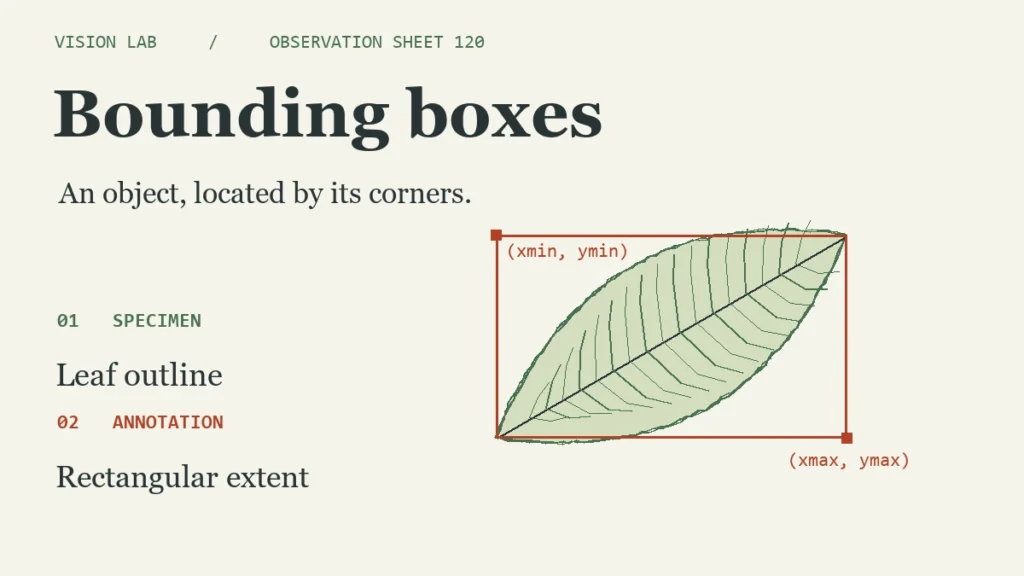
A bounding box in object detection is a rectangle that says where an object is. Imagine labeling a photo of a leaf: a class label says “leaf,” a box marks its extent, and a segmentation mask would trace which pixels belong to it. The box includes some background. Four numbers can describe it, but only if the reader knows what those numbers mean.
Set the origin and the edge convention
For this example, use an axis-aligned box in a 640-pixel-wide, 384-pixel-high image. Put the origin at its top-left edge: x increases to the right and y increases downward. Treat coordinates as pixel edges. Include the left and top edges; exclude the right and bottom edges. This is the same convention as a Python array slice, image[y1:y2, x1:x2]: rows first, columns second.
Under this convention, a nonempty box inside the image satisfies 0 ≤ x1 < x2 ≤ 640 and 0 ≤ y1 < y2 ≤ 384. The right edge can be 640 even though the last column index is 639. If a source instead gives the zero-based last included pixel, add one to its maximum x and y before using these formulas. Do not add one to continuous edge coordinates.
Convert pixel corners (xyxy) to top-left plus size (xywh)
Suppose the leaf lies in xyxy = (80, 48, 320, 240). The first pair marks the top-left corner; the second marks the opposite edge. With integer edges, the last included pixel is (319, 239). Subtract the corners to get the size: width = 320 − 80 = 240 pixels; height = 240 − 48 = 192 pixels. The top-left point stays put, so xywh = (80, 48, 240, 192).
To reverse the conversion, keep (80, 48) and add the size: 80 + 240 = 320; 48 + 192 = 240. Both boxes cover 240 × 192 = 46,080 pixel cells. Passing the xywh tuple to a function expecting xyxy would still draw a plausible rectangle, but only 160 pixels wide and 144 high. A format mismatch need not raise an error.
Normalize a center-based box for a YOLO label
A normalized coordinate is a fraction of an image dimension, not a pixel count. The Ultralytics detection label format puts a class ID first, then normalized center x, center y, width, height. Its first two coordinates are not the top-left corner. For the leaf, the center is (80 + 240/2, 48 + 192/2) = (200, 144) pixels.
Divide horizontal quantities by width (640) and vertical quantities by height (384). The result is (200/640, 144/384, 240/640, 192/384) = (0.3125, 0.375, 0.375, 0.5). If your dataset maps leaf to class 0, its label line is 0 0.3125 0.375 0.375 0.5. The leading zero is a class, not a coordinate.
Check the round trip: multiply the normalized values by (640, 384, 640, 384) to recover center (200, 144) and size (240, 192). Subtract half the size for the top-left: (200 − 120, 144 − 96) = (80, 48). Add half the size for the opposite edges: (200 + 120, 144 + 96) = (320, 240). That is the original box.
Check the box on the image you will actually use
Record the coordinate order, units, origin, edge convention, and image dimensions alongside the label. If an image was cropped or padded, the origin may have moved: transform the box into the new frame before normalizing it. Keep fractional coordinates during conversion and round only when a downstream operation requires integer pixels. Overlay the decoded rectangle on that same image; a round trip alone cannot tell you whether the original annotation enclosed the right leaf.
For code that converts corner and size formats, see the Torchvision box_convert reference. Choose the input and output formats explicitly; rearranging coordinates is not the same as normalizing them. For context on why a detector needs a location as well as a label, compare image recognition and other neural network applications.
Further reading
The authors of Dive into Deep Learning illustrate corner and center representations in their free chapter on object detection and bounding boxes.
As an Amazon Associate I earn from qualifying purchases. Dive into Deep Learning, first edition (paperback), on Amazon.com.


